Rimusta Keynote Template: A Versatile Design Tool
Creating a compelling presentation often feels like a balancing act between aesthetic appeal and functional clarity. For many, the blank slide is more intimidating than the content itself. This is where a structured design system becomes invaluable. The Rimusta - Keynote Template offers a streamlined solution for anyone looking to elevate their visual communication without starting from scratch. It is not merely a collection of pretty backgrounds; it is a comprehensive toolkit designed to adapt to various professional and personal narratives.
At its core, this template provides 150 total slides across five premade color schemes. This variety ensures that whether you are pitching a conservative financial report or showcasing a vibrant creative portfolio, there is a visual language that fits your brand identity. The inclusion of 30 useful, specialized slides means that common presentation hurdles—such as displaying complex data, introducing team members, or outlining project timelines—are already solved structurally. You can focus on refining your message rather than wrestling with alignment tools.
Why Design Flexibility Matters for Different Users
The value of a template like Rimusta changes depending on who is holding the mouse. For a freelancer or small business owner, time is directly correlated with income. Spending hours adjusting margins or hunting for the right icon is time not spent on client acquisition or service delivery. Here, the "drag and drop" functionality is not just a convenience; it is an efficiency engine. The ability to quickly replace placeholder images and input content allows for rapid iteration. If a client requests a last-minute change to the color scheme, switching between the five premade options takes seconds, preserving both professionalism and peace of mind.
For educators and trainers, clarity is paramount. Students and attendees need to follow logical flows without being distracted by chaotic design elements. The vector-based nature of the graphics in Rimusta ensures that charts, diagrams, and icons remain crisp regardless of screen size or projection quality. This reliability is crucial in lecture halls or webinar settings where technical glitches can disrupt learning. The master slide foundation means that once a header style is set, it applies consistently throughout the deck, reinforcing a cohesive educational experience.
Bridging the Gap Between Beginners and Professionals
One of the most significant barriers to entry for high-quality presentations is the perceived technical skill required. Beginners often fear that using a sophisticated template will result in a broken layout if they make a single wrong move. Rimusta addresses this by being fully editable yet robustly structured. The use of recommended free web fonts ensures that the typography looks intentional and modern without requiring expensive software licenses or complex font management. A beginner can confidently swap text, knowing the hierarchy and spacing are pre-optimized for readability.
Conversely, experienced designers and marketers may worry that templates restrict creativity. However, the vector-based elements in this template offer a different kind of freedom. Because the shapes and icons are scalable vectors, they can be recolored, resized, and reshaped without losing quality. A professional marketer might use the base structure of a slide but tweak the accent colors to match a specific campaign’s hex codes precisely. The animated slides included provide a dynamic layer that can be customized to suit the pacing of a live pitch, adding a layer of polish that static slides lack.
Practical Applications Across Industries
Consider the diverse ways this tool can be deployed. A startup founder preparing for investor meetings needs to convey trust and innovation simultaneously. Using one of the darker, sleeker premade colors from the Rimusta set can evoke sophistication, while the clean data visualization slides help break down complex metrics into digestible insights. The animated transitions can guide the investor’s eye through the growth trajectory, making the narrative more persuasive.
In contrast, a lifestyle blogger or influencer might prioritize aesthetic cohesion with their social media presence. They can utilize the lighter, airier color palettes to maintain a bright and inviting tone. The image placeholders are designed to accommodate high-resolution photography, allowing their visual content to take center stage while the text supports rather than overwhelms the imagery. For them, the template serves as a consistent brand frame across multiple video backdrops or digital lookbooks.
Even for corporate employees tasked with internal reporting, the utility is clear. Standardizing reports across a department ensures that leadership can compare data sets without being distracted by differing formats. By adopting Rimusta as a team standard, organizations reduce the cognitive load on readers. The readme file included with the download provides essential guidance, ensuring that even non-designers within the team can maintain the integrity of the template’s structure.
Evaluating Quality and Long-Term Usefulness
When assessing whether this template matches your needs, consider the longevity of the assets. Vector-based graphics do not pixelate, meaning these slides will remain relevant even as display technologies improve. The reliance on master slides ensures that global changes—such as updating a company logo or changing a primary brand color—can be executed instantly across all 150 slides. This scalability is vital for growing businesses that anticipate rebranding or expansion.
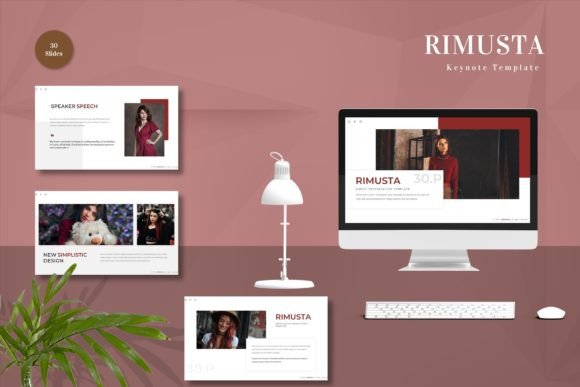
It is also important to note what is not included. Preview images are for demonstration purposes only, so users must bring their own photography or illustrations. This is actually a benefit, as it encourages authenticity. Stock photos can often feel generic; by forcing the user to insert their own visuals, the final presentation becomes uniquely theirs. The template provides the stage, but you provide the performance.
Making the Right Choice for Your Next Project
If you are looking for a solution that balances ease of use with professional-grade output, Get it now Rimusta - Keynote Template for All Business and Personal Needs. It is particularly suited for those who value efficiency but refuse to compromise on visual standards. Whether you are a hobbyist creating a family reunion slideshow or a consultant delivering a high-stakes proposal, the underlying principle remains the same: good design should facilitate communication, not hinder it.
The five keynote files included offer widescreen compatibility, which is the standard for modern monitors and projectors. This attention to technical detail saves users from the frustration of aspect ratio mismatches. Furthermore, the inclusion of animated slides adds a layer of engagement that can keep audiences attentive during longer presentations. However, the key to success lies in restraint. The animations are tools to emphasize points, not distractions to be overused.
Ultimately, the decision to use a template like Rimusta comes down to your priorities. If you prioritize speed, consistency, and a polished look without the steep learning curve of advanced graphic design software, this tool aligns well with your goals. It empowers users to focus on the substance of their message, confident that the form will hold up under scrutiny. By providing a solid, editable foundation, it allows creativity to flourish within a structured framework, making it a versatile asset for a wide range of presenters.