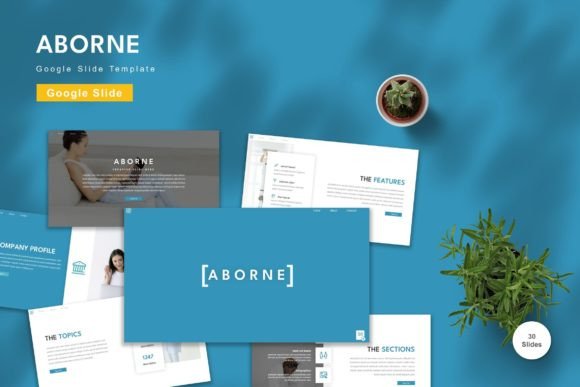
Aborne: The Versatile Google Slide Template
Creating a compelling presentation often feels like a balancing act. You need to convey complex information clearly, maintain visual interest, and do it all within a tight deadline. For many professionals, students, and entrepreneurs, the blank slide is the most intimidating part of the process. This is where a well-designed framework becomes invaluable. The Aborne - Google Slide Template offers a streamlined solution for anyone looking to elevate their visual storytelling without getting bogged down in technical design details. It is not just a collection of pretty pictures; it is a functional tool designed to adapt to your specific narrative needs.
Why Design Flexibility Matters
In today’s fast-paced digital environment, one size rarely fits all. A marketing pitch requires a different tone than an academic lecture or a personal portfolio review. The primary appeal of Aborne lies in its adaptability. With 150 total slides spread across five premade colors, this template provides a robust foundation for various contexts. Whether you are presenting quarterly financial results, teaching a workshop, or showcasing a creative project, the variety ensures you will find a layout that resonates with your audience.
The concept of vector-based design is crucial here. Unlike standard image files that can become pixelated when resized, vector elements remain crisp and clear at any scale. This means you can expand a chart, icon, or shape to fill the screen without losing quality. For beginners who might not understand the technical nuances of graphic design, this feature automatically ensures a professional look. You do not need to worry about resolution settings; the template handles the heavy lifting for you.
Simplifying the Editing Process
One of the biggest barriers to creating great presentations is the learning curve associated with design software. Many users feel overwhelmed by complex tools that require hours of training. Aborne is built on the principle of ease. Since it is designed for Google Slides, it leverages a platform most people already know how to use. The interface is familiar, reducing the friction between having an idea and executing it.
The template utilizes master slides, which is a powerful but often underused feature. Master slides allow you to make global changes quickly. If you decide that your brand color should be navy blue instead of royal blue, you can adjust it in one place, and the change propagates throughout the presentation. This saves immense amounts of time, especially when working on large decks. Additionally, the instruction to just drag and drop is not just marketing fluff; it reflects the actual user experience. Placeholders are clearly marked, making it intuitive to swap out generic images for your own photos or graphics.
Practical Applications for Different Users
Who exactly benefits from a tool like this? The answer is broader than you might think. Let’s look at a few realistic scenarios:
- Entrepreneurs and Startups: When seeking investment, clarity is key. The 30 useful slides included in the package likely cover essential structures like problem-solution frameworks, team introductions, and market analysis charts. Using a consistent, polished look helps build credibility with potential investors.
- Educators and Trainers: Teachers often need to create engaging materials quickly. The animated slides included in the template can help break up monotony and keep students focused. The ability to change colors easily means a teacher can create distinct themes for different subjects or units.
- Freelancers and Creatives: A portfolio presentation needs to highlight work without distracting from it. The clean, vector-based layouts provide a neutral yet stylish backdrop that lets your projects shine. You can input your content, replace placeholder images with your best work, and have a client-ready deck in minutes.
For small business owners, the value proposition is equally strong. Time is a scarce resource. Instead of spending days designing a slide deck from scratch, you can focus on refining your message. The recommended free web fonts ensure that your text looks modern and readable on any device, avoiding the common pitfall of using obscure fonts that do not render correctly on other computers.
Understanding the Package Contents
When you decide to get the Aborne template, it is important to know what you are receiving. The package includes five Google Slide files, each corresponding to one of the five premade color schemes. This separation allows you to choose the vibe that best matches your brand or topic before you even start typing. The widescreen format is standard for modern displays, ensuring your presentation looks correct on laptops, tablets, and large conference room screens.
A critical detail to note is the Readme First file. While the template is designed to be user-friendly, taking a moment to read the included instructions can save you from minor confusion later. It may contain specific tips on how to best utilize the master slides or how to access the animated features. Ignoring this step is a common mistake among beginners who dive straight into editing.
It is also worth mentioning that preview images are not included. This is a standard practice in digital template sales to protect intellectual property, but it means you should rely on the product description and feature list rather than expecting exact visual replicas in your download folder. The placeholders are there for you to fill, which is ultimately the goal.
Key Considerations Before You Start
While Aborne is a powerful tool, it is not magic. To get the most out of it, consider your content strategy first. A beautiful template cannot save a poorly structured argument. Use the 30 useful slides as a guide for organizing your thoughts, but do not feel compelled to use every single slide. Curate your presentation to include only what is necessary for your audience.
Additionally, while the colors are premade, they are fully editable. If your company has strict brand guidelines, you can tweak the hues to match exactly. However, stick to the recommended free web fonts unless you have a specific reason to change them. These fonts are chosen for their readability and compatibility across different operating systems. Straying too far from these recommendations can sometimes lead to formatting issues when sharing files with others.
Finally, remember that animation should be used sparingly. The included animated slides are a nice touch, but overusing transitions can distract from your message. Use them to emphasize key points or to reveal information sequentially, rather than for decorative purposes.
In summary, the Aborne - Google Slide Template is a practical, efficient, and visually appealing resource for anyone who needs to communicate ideas effectively. By combining ease of use with professional design standards, it empowers users to create presentations that are both informative and engaging. Whether you are a seasoned marketer or a student preparing for your first major project, this tool provides the structure you need to succeed.