Brando PowerPoint Template Review
In the fast-paced world of professional communication, the visual impact of your presentation can be just as critical as the data you present. Whether you are pitching a startup idea, teaching a complex concept, or sharing quarterly results, the design framework you choose sets the tone for your entire message. This is where Brando - Powerpoint Template enters the conversation, offering a structured yet flexible solution for those who need to create polished slides without starting from scratch.
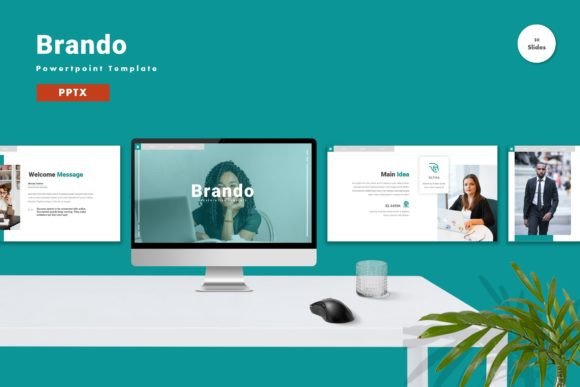
At its core, Brando is a comprehensive slide deck designed to streamline the creation process. It is not merely a collection of static images but a fully editable toolkit. With 150 total slides spread across five premade color schemes, it provides a robust foundation for various types of content. For many users, the appeal lies in the balance between aesthetic professionalism and functional simplicity. The template relies on vector-based graphics and master slides, ensuring that every element remains crisp and adjustable regardless of how much you customize it.
Why Design Flexibility Matters for Different Users
The value of a presentation template is rarely one-size-fits-all. Different professionals approach slide design with unique priorities, and understanding how Brando aligns with these varying needs can help you decide if it is the right tool for your workflow.
For entrepreneurs and small business owners, time is often the most scarce resource. When preparing for investor meetings or client pitches, the ability to drag and drop content into pre-designed layouts is invaluable. Brando’s inclusion of 30 useful, specialized slides means that common presentation structures—such as team introductions, timeline overviews, and SWOT analyses—are already built. This allows business owners to focus on refining their narrative rather than wrestling with alignment tools or font choices. The five premade colors also offer immediate branding options, enabling a quick adaptation to corporate identity guidelines without requiring deep graphic design knowledge.
Marketers and content creators, on the other hand, may prioritize visual engagement and creativity. They often need to break through the noise of standard corporate decks. The animated slides included in Brando provide a dynamic element that can help retain audience attention. Furthermore, because all elements are editable, marketers can tweak shapes, icons, and placeholders to match specific campaign aesthetics. The use of recommended free web fonts ensures that the typography remains modern and accessible, avoiding the licensing headaches associated with proprietary typefaces. This flexibility allows creators to maintain a high level of visual consistency while still injecting their unique brand voice into every slide.
Educators and Trainers: Clarity Over Complexity
In educational settings, the primary goal is knowledge transfer. Educators, trainers, and workshop facilitators often struggle with balancing informational density with visual clarity. A cluttered slide can distract learners, while a sparse one may fail to provide necessary context. Brando addresses this by offering clean, vector-based layouts that emphasize readability. The master slide functionality is particularly beneficial here; once an educator sets up the header, footer, and logo placement, every subsequent slide automatically adheres to that structure. This consistency helps students follow the lesson flow without visual interruptions.
Moreover, the template’s widescreen format aligns with modern classroom technology and remote learning platforms. Whether presenting via a projector in a lecture hall or sharing screens during a webinar, the 16:9 aspect ratio ensures that content fills the view appropriately. The ability to easily replace placeholder images with diagrams, charts, or relevant photos allows teachers to tailor the material specifically to their curriculum, making abstract concepts more tangible for students.
Freelancers and Consultants: Professionalism on Demand
Freelancers and independent consultants often wear multiple hats, acting as both the service provider and the marketing department. For them, the perceived quality of their deliverables directly influences client trust. Using a generic or poorly formatted presentation can undermine expertise, whereas a sleek, well-organized deck reinforces credibility. Brando offers a level of polish that might otherwise require hiring a dedicated designer. The inclusion of a readme file and the straightforward "drag and drop" editing process mean that even those with limited technical skills can produce high-end results.
Additionally, the commercial value of such a template lies in its reusability. A consultant can adapt the five premade color schemes for different clients, creating a bespoke feel for each project without building a new deck from zero every time. This efficiency translates to higher profit margins and faster turnaround times, which are crucial in competitive freelance markets.
Evaluating Ease of Use and Technical Requirements
One of the most significant barriers to adopting new design tools is the learning curve. Brando is designed to mitigate this by relying on standard PowerPoint functionalities. Since it comes in PPTX format, it is compatible with most versions of Microsoft PowerPoint, eliminating the need for specialized software. The emphasis on "just drag and drop" editing means that users do not need to understand complex layering techniques or vector editing software like Illustrator.
However, it is important to note what is not included. Preview images are not part of the download, which is standard for digital assets to protect intellectual property, but users should be aware that they will need to source their own photography or graphics to replace the placeholders. This is actually a benefit for many, as it encourages the use of original, relevant imagery rather than generic stock photos that can make presentations feel impersonal. The recommendation to use free web fonts also keeps the file size manageable and ensures that the presentation looks consistent when shared with others who may not have the same font library installed.
Making the Right Choice for Your Next Project
Deciding whether to invest in a template like Brando depends on your current pain points. If you find yourself spending hours aligning text boxes, searching for cohesive color palettes, or worrying about inconsistent formatting, a master-slide-based template can reclaim that time. It is particularly suitable for those who need to produce presentations regularly but do not have the budget or desire to maintain a full-time design team.
For beginners, the structured nature of the 150 slides provides a safety net, guiding them toward best practices in layout and hierarchy. For experienced users, it serves as a time-saving accelerator, allowing them to bypass the initial setup phase and dive straight into content refinement. The key is to view the template not as a rigid constraint, but as a flexible scaffold. By leveraging the editable vectors and animated elements, you can infuse your personal or brand identity into the framework, resulting in a presentation that feels custom-made.
Ultimately, tools like Brando - Powerpoint Template are about empowering users to communicate more effectively. By removing the technical friction of design, it allows the focus to return to the message itself. Whether you are a hobbyist looking to organize a community event, a corporate executive preparing for a board meeting, or a teacher crafting a semester syllabus, the right template can enhance clarity, boost confidence, and ensure your audience receives your ideas exactly as intended.