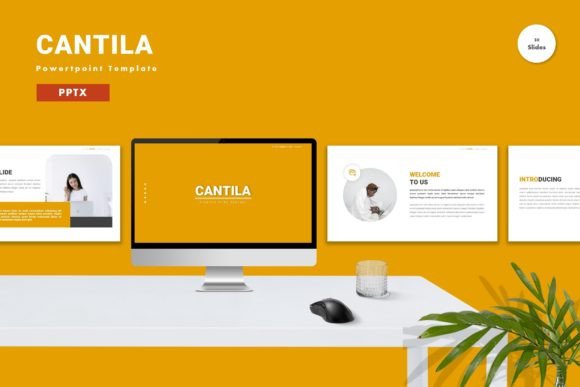
Evaluating Cantila: A Versatile PowerPoint Template for Modern Presentations
In the landscape of professional communication, the visual quality of a presentation often determines its reception. Whether you are pitching a startup idea, delivering an academic lecture, or presenting quarterly results to stakeholders, the design framework you choose sets the tone before you speak a single word. Cantila - Powerpoint Template has emerged as a notable option for individuals and teams seeking a balance between aesthetic appeal and functional flexibility. This article explores what makes this template distinct, how it compares to other design resources, and whether it aligns with your specific presentation needs.
Understanding the Core Value Proposition
At its heart, Cantila is designed to remove the technical friction from slide creation. Many professionals spend hours adjusting alignment, choosing fonts, and fixing broken layouts rather than focusing on their narrative. This template addresses that pain point by offering a fully editable environment where every element can be manipulated. The promise is simple: input your content, replace placeholder images, adjust colors to match your brand, and utilize pre-built animations to enhance engagement.
The structure includes 150 total slides distributed across five premade color schemes. This volume is significant because it provides variety without requiring the user to design new slides from scratch. With 30 unique, useful slide layouts repeated in different color variations, users have access to a comprehensive toolkit that covers most standard presentation scenarios, from title pages and team introductions to complex data visualization and conclusion slides.
Design Flexibility and Customization
One of the primary considerations when selecting a presentation resource is adaptability. A rigid template may look impressive in previews but fail when applied to real-world content that varies in length and format. Cantila utilizes vector-based graphics and master slides, which are critical features for maintaining consistency and quality. Vector elements ensure that icons and shapes remain crisp regardless of scaling, avoiding the pixelation issues common with raster images.
The reliance on master slides means that global changes—such as updating a logo or changing a primary brand color—can be executed efficiently across the entire deck. This is particularly valuable for corporate users who need to maintain strict brand guidelines. Furthermore, the template recommends free web fonts, ensuring that the typography remains accessible and consistent even if the file is opened on a device that does not have specialized font libraries installed. This attention to compatibility reduces the risk of formatting errors during live presentations.
Comparing Template-Based Solutions vs. Custom Design
When evaluating Cantila, it is helpful to place it within the broader context of presentation design options. On one end of the spectrum is custom graphic design, where a professional designer creates a unique deck from scratch. This approach offers unparalleled uniqueness but comes with high costs and long turnaround times. On the other end are generic, free templates found through basic search engines, which often lack coherence, use outdated design trends, or include restrictive licensing.
Cantila occupies a middle ground, often referred to as "premium templating." It offers the polish and structural integrity of custom design at a fraction of the cost and time. For small businesses, freelancers, and internal corporate teams, this trade-off is usually favorable. The drag-and-drop functionality allows users with minimal design experience to achieve a professional look. However, it is important to recognize that while the template provides a strong foundation, the final output still depends on the user’s ability to curate content effectively. A beautiful template cannot compensate for unclear messaging or cluttered slides.
Assessing the Feature Set and Usability
The inclusion of animated slides is a notable feature in the Cantila package. Animation, when used sparingly, can guide the audience’s attention and improve information retention. The pre-configured animations in this template are designed to be subtle and professional, avoiding the distracting transitions that often plague amateur presentations. Users can easily modify or remove these animations if they prefer a static approach, providing control over the pacing of the presentation.
The package includes five PPTX files, each corresponding to a different color premise. This separation allows users to choose the vibe that best suits their topic—whether it is a bold, high-contrast scheme for a tech launch or a softer, muted palette for a healthcare briefing. The widescreen format ensures compatibility with modern projectors and monitors, which is essential given that 4:3 aspect ratios are increasingly obsolete in professional settings.
However, potential users should note that preview images are not included in the download. This is a standard practice in digital asset marketplaces to protect intellectual property, but it means users must rely on the product listing’s visuals for initial assessment. Additionally, while the template is highly editable, it requires a basic understanding of PowerPoint’s interface. Users unfamiliar with master slides or vector editing may need to consult the included readme file or online tutorials to fully leverage the template’s capabilities.
Best-Fit Scenarios and Limitations
Cantila is particularly well-suited for:
- Business Professionals: Who need to produce regular reports, pitches, or training materials with a consistent, polished look.
- Entrepreneurs and Startups: Who require investor-ready decks quickly without the budget for a dedicated design team.
- Educators and Trainers: Who benefit from the variety of layout options to keep educational content engaging.
- Personal Projects: Such as portfolios or event presentations where visual impact matters.
Conversely, this template may not be the ideal choice for users seeking highly specialized, non-standard layouts. If your presentation requires complex interactive elements, embedded video backgrounds, or integration with advanced data analytics tools beyond standard charts, you might find the static nature of traditional PowerPoint templates limiting. In such cases, specialized presentation software or custom development might be necessary.
Making an Informed Decision
Choosing the right presentation tool involves balancing time, budget, and desired outcome. Cantila offers a robust solution for those who value efficiency and aesthetic quality. Its strength lies in its versatility; the five color schemes and extensive slide library provide enough variety to prevent visual fatigue across multiple presentations. The emphasis on editability ensures that the template serves as a flexible canvas rather than a restrictive mold.
Before purchasing, consider your workflow. If you frequently create presentations and struggle with design consistency, investing in a high-quality template like Cantila can save significant time in the long run. The ability to drag, drop, and customize elements allows you to focus on refining your message rather than wrestling with alignment tools. However, if you only create presentations rarely, or if your organization already has a strict, custom-designed brand template, the utility of this product may be diminished.
Ultimately, Cantila represents a practical investment for anyone looking to elevate their visual communication. By providing a solid structural foundation, it empowers users to present their ideas with confidence and clarity. As with any tool, its effectiveness depends on how well it is integrated into your broader communication strategy. Take the time to explore the features, understand the editing capabilities, and determine if its style aligns with your personal or brand identity. When used thoughtfully, it can transform a standard slideshow into a compelling visual narrative.