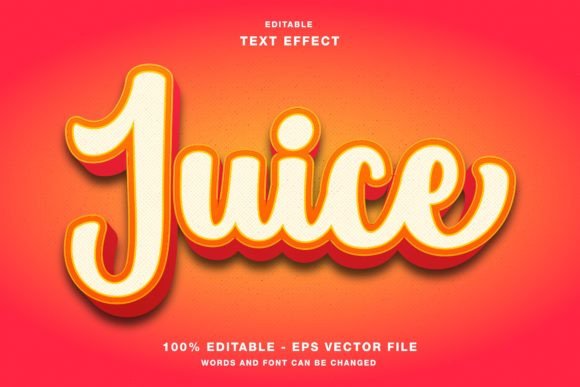
Juice 3d: Elevating Digital Typography with Editable Vector Effects
In the fast-paced world of digital design, typography is no longer just about choosing the right font. It is about creating an experience, a visual hook that captures attention in a split second. Whether you are scrolling through Instagram, reading a magazine, or viewing a promotional flyer, the way text is presented can determine whether you engage with the content or scroll past it. This is where tools like Juice 3d come into play. Designed specifically for Adobe Illustrator, this editable text effect template offers a streamlined solution for creators who need high-impact, three-dimensional typography without the steep learning curve of complex 3D modeling software.
The Evolution of Text Effects in Modern Design
For years, achieving a polished 3D text look required a combination of advanced skills in multiple software programs. Designers often had to create flat vectors in Illustrator, export them to a 3D rendering engine, apply lighting and textures, and then import the result back as a static image. This workflow was not only time-consuming but also rigid. If a client wanted to change a single letter or adjust the wording, the entire process often had to be restarted from scratch.
Juice 3d addresses this friction by providing a fully editable environment within Illustrator. By keeping the workflow vector-based and layer-organized, it allows for rapid iteration. This is crucial for professionals who work under tight deadlines, such as social media managers who need to pivot their visual strategy based on real-time trends, or event organizers who need to update poster details at the last minute. The value proposition here is not just aesthetic; it is operational efficiency.
Key Features and Technical Characteristics
Understanding what makes this template effective requires a look at its technical foundation. Unlike raster-based effects that lose quality when scaled, Juice 3d leverages the power of vector graphics. Here are the core characteristics that define its utility:
- Full Editability: Every element within the template is customizable. You can change the text, adjust colors, and modify shapes without breaking the effect. This ensures that the design remains flexible throughout the creative process.
- RGB Color Mode: The text effect is optimized for the RGB color space. This is a critical detail for users intending to use the designs for digital platforms, including web designs, social media promotions, and digital publications. RGB ensures that colors appear vibrant and accurate on screens, which is where most modern audiences consume content.
- Comprehensive File Inclusion: The main folder includes both EPS and JPG files. The EPS file allows for deep customization within vector software, while the JPG provides a quick-preview or ready-to-use asset for simpler workflows.
- Cross-Platform Versatility: While created in Illustrator, the output is suitable for a wide range of applications. From Twitter headers to Facebook ads, the scalable nature of the design ensures clarity across different device resolutions.
Practical Applications Across Industries
The versatility of Juice 3d means it is not limited to a single type of creator. Its application spans various industries and use cases, making it a valuable asset for a diverse audience.
Social Media and Digital Marketing
In the realm of social media, visual noise is a significant challenge. Brands compete for attention in crowded feeds on platforms like Instagram, Twitter, and Facebook. A standard flat font often gets lost. Using a 3D text effect adds depth and prominence to headlines. For example, a fashion brand launching a new summer collection could use Juice 3d to create bold, colorful headlines for their Instagram stories. The ability to quickly edit the text means they can reuse the same stylish template for daily updates, maintaining brand consistency while saving time.
Print and Publication Design
Although the template is optimized for RGB, it serves as an excellent starting point for print materials as well. Designers creating flyers, posters, magazines, or event papers can use the vector structure to establish the layout and visual hierarchy. Once the design is finalized, colors can be converted to CMYK if necessary for professional printing. The 3D effect adds a tactile quality to printed materials, making event posters stand out on community bulletin boards or magazine covers pop off the shelf.
Web Design and User Interface
Web designers are increasingly incorporating 3D elements to create immersive user experiences. Juice 3d can be used to create engaging headers for landing pages, call-to-action buttons, or feature highlights. Because the files are editable, developers and designers can tweak the dimensions to fit specific responsive design requirements, ensuring that the text looks good on both desktop monitors and mobile screens.
Evaluating Suitability for Your Projects
While Juice 3d offers significant advantages, it is essential to evaluate whether it fits your specific project needs. Not every design requires a 3D effect, and overuse can lead to visual clutter. Here are some considerations to help you decide:
- Target Audience: Is your audience accustomed to bold, modern aesthetics? Younger demographics on platforms like TikTok or Instagram often respond well to dynamic, 3D-styled typography. However, for more conservative corporate reports, a subtler approach might be better.
- Brand Identity: Does the 3D style align with your brand guidelines? If your brand is known for minimalism and flat design, introducing a heavy 3D effect might feel disjointed. Use Juice 3d to enhance brands that want to appear playful, innovative, or energetic.
- Technical Proficiency: Although the template is designed to be user-friendly, basic familiarity with Adobe Illustrator is required to make the most of its editable features. Users should be comfortable with layers, text tools, and color panels.
Strengths and Limitations
To maintain a balanced perspective, it is important to acknowledge both the strengths and the limitations of using pre-made text effect templates.
Strengths: The primary strength of Juice 3d is speed. It democratizes high-end design techniques, allowing non-experts to achieve professional results. The editable nature ensures that the design does not become a static dead-end, offering longevity and reusability. Furthermore, the inclusion of both vector and raster files provides flexibility for different stages of the design process.
Limitations: Since the color mode is RGB, users must be cautious when transitioning to print. Directly printing RGB files can result in duller colors than expected. Additionally, while the template is customizable, it is still a template. Over-reliance on it without modification can lead to generic-looking designs. Creativity is still required to adapt the effect to unique brand voices.
Best Practices for Implementation
To get the most out of Juice 3d, consider these best practices:
- Keep it Legible: 3D effects can sometimes obscure readability. Ensure that there is enough contrast between the text and the background. Test your designs on small screens to ensure the text remains clear.
- Consistency is Key: If you use this effect for a campaign, apply it consistently across all assets. Use the same color palette and lighting direction to create a cohesive visual identity.
- Experiment with Colors: Don’t be afraid to deviate from the default colors. The editable nature of the template invites experimentation. Try gradients or neon hues to match current design trends.
- Layer Management: Keep your Illustrator layers organized. This will make future edits easier, especially if you need to hand off the file to another designer or developer.
Conclusion
In conclusion, Juice 3d represents a practical and efficient tool for modern creators. It bridges the gap between complex 3D design and accessible graphic editing, empowering users to produce high-quality, eye-catching typography for a variety of media. Whether you are a social media manager looking to boost engagement, a web designer aiming for a modern aesthetic, or a print designer seeking to add depth to your layouts, this template offers a solid foundation. By understanding its features, respecting its limitations, and applying it with creativity, you can elevate your visual communication and stand out in a crowded digital landscape. Remember, the tool is only as good as the vision behind it; use Juice 3d to amplify your message, not just decorate it.