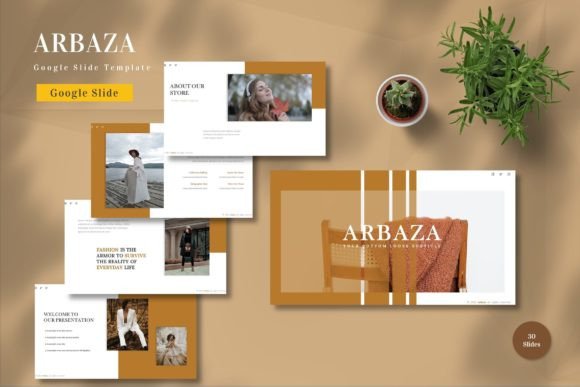
Streamline Your Presentations with the Arbaza Google Slide Template
In today’s fast-paced professional environment, the ability to communicate ideas clearly and visually is more critical than ever. Whether you are pitching a startup concept to investors, delivering a quarterly report to stakeholders, or presenting a personal portfolio, the quality of your visual aids can significantly influence how your message is received. However, creating high-quality presentations from scratch is often a time-consuming process that requires design skills many professionals simply do not have. This is where the Arbaza - Google Slide Template emerges as a powerful solution for individuals and businesses alike. By offering a comprehensive, editable, and aesthetically pleasing framework, this template allows users to focus on their content rather than struggling with layout and design mechanics.
Overcoming the Design Barrier in Professional Communication
Many professionals face a common dilemma: they have valuable insights and data to share, but lack the graphic design expertise to present them compellingly. Starting with a blank slide can be intimidating and inefficient. Hours are often wasted aligning text boxes, searching for consistent color palettes, and trying to make charts look professional. The result is frequently a disjointed presentation that fails to engage the audience or, worse, distracts from the core message.
The Arbaza - Google Slide Template addresses these challenges by providing a ready-made structure that adheres to modern design principles. It eliminates the guesswork involved in slide creation. With 150 total slides spread across five premade color schemes, users have a vast library of layouts at their fingertips. This variety ensures that no matter the type of content—be it dense data analysis, inspirational quotes, or team introductions—there is a suitable slide design available. The template is built on master slides, which means that changes made to the master layout automatically propagate throughout the presentation, ensuring consistency and saving significant editing time.
Versatility for Business and Personal Needs
One of the standout features of the Arbaza - Google Slide Template is its versatility. It is not limited to a single industry or use case. For corporate users, the clean lines and professional typography make it ideal for business proposals, marketing strategies, and financial reports. The inclusion of vector-based elements ensures that graphics remain crisp and clear regardless of scaling, which is essential for maintaining a polished look on large projection screens or high-resolution monitors.
However, the utility of this template extends beyond the boardroom. Educators can use it to create engaging lesson plans, students can utilize it for thesis defenses, and freelancers can leverage it to showcase their portfolios. The five premade colors allow users to select a tone that matches their brand identity or personal style. Whether you need a bold, energetic palette for a creative agency or a subdued, trustworthy scheme for a legal firm, the Arbaza - Google Slide Template offers the flexibility to adapt without requiring advanced design software knowledge.
Ease of Use and Customization
A major concern for many users when adopting new templates is the learning curve. Fortunately, the Arbaza - Google Slide Template is designed with user-friendliness in mind. All elements within the template are fully editable. Users can easily input their own content, replace placeholder images with their own visuals, and adjust colors to fit specific branding guidelines. The drag-and-drop functionality simplifies the process of rearranging elements, making it accessible even for those with minimal technical skills.
The template utilizes recommended free web fonts, which ensures that the typography remains consistent and legible across different devices and operating systems. This is a crucial consideration for collaborative environments where multiple team members may be accessing and editing the presentation from various locations. Furthermore, the inclusion of animated slides adds a dynamic element to presentations, helping to maintain audience engagement without overwhelming them with excessive motion. These animations are pre-configured, so users can simply enable them or tweak them slightly to suit their pacing preferences.
Practical Applications and Implementation Strategies
To get the most out of the Arbaza - Google Slide Template, it is helpful to approach the customization process strategically. Start by reviewing the readme information included in the download package. This guide provides essential tips on how to navigate the master slides and utilize the vector assets effectively. Begin by selecting one of the five premade color schemes that best aligns with your objective. If you are representing a company, choose the palette that complements your brand colors. For personal projects, select the scheme that evokes the desired emotional response from your audience.
Next, identify the 30 useful slides that correspond to the structure of your presentation. Most effective presentations follow a narrative arc: an introduction, a problem statement, a solution, supporting evidence, and a call to action. The Arbaza - Google Slide Template includes layouts for each of these stages. For instance, use the title slides to make a strong first impression, employ the comparison layouts to highlight competitive advantages, and utilize the data visualization slides to present complex statistics in an digestible format.
When replacing placeholder images, ensure that your visuals are high-resolution and relevant to the accompanying text. Since the template is vector-based, you can also customize icons and shapes to further tailor the design. Remember that less is often more; avoid cluttering slides with too much text. Let the design breathe and use bullet points or short phrases to convey key ideas, relying on your verbal delivery to provide the details.
Why Choose Arbaza for Your Next Presentation?
In a market saturated with generic templates, the Arbaza - Google Slide Template stands out due to its comprehensive nature and attention to detail. The package includes five Google Slide files, each featuring widescreen formatting, which is the standard for modern displays. This ensures that your presentation will look professional on any contemporary screen. The fact that preview images are not included in the final download is a minor note, but the actual content far exceeds the expectations set by typical previews.
For teams working remotely, the cloud-based nature of Google Slides combined with the structured approach of the Arbaza template facilitates seamless collaboration. Multiple users can work on different sections of the presentation simultaneously, knowing that the underlying design structure will remain intact. This reduces the friction often associated with merging different design styles into a single cohesive document.
Ultimately, the goal of any presentation is to persuade, inform, or inspire. The Arbaza - Google Slide Template serves as a reliable foundation that supports these goals by removing technical barriers and enhancing visual appeal. By investing in a tool that prioritizes both aesthetics and functionality, you empower yourself to communicate with greater confidence and clarity. Whether you are a seasoned presenter or a novice looking to make a good impression, this template provides the resources needed to elevate your storytelling.
If you are ready to transform the way you present your ideas, consider integrating the Arbaza - Google Slide Template into your workflow. Its blend of editable elements, diverse layouts, and user-friendly design makes it an invaluable asset for anyone serious about effective communication. Get it now and experience the difference that professional-grade design can make in your business and personal endeavors.