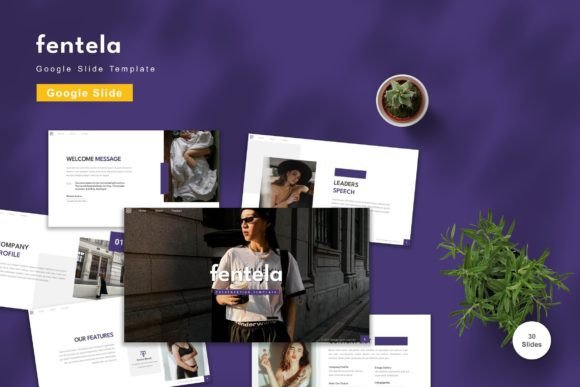
Evaluating the Fentela Google Slide Template for Professional Presentations
In the realm of digital communication, the visual quality of a presentation often determines how effectively a message is received. Whether for corporate boardrooms, academic lectures, or personal portfolios, the underlying design framework plays a critical role in audience engagement. The Fentela - Google Slide Template has emerged as a notable option for individuals and teams seeking a balance between aesthetic appeal and functional flexibility. This article explores the features, utility, and practical considerations of this template to help you determine if it aligns with your specific presentation needs.
Understanding the Core Offering
The Fentela template is designed specifically for the Google Slides platform, leveraging the cloud-based nature of the software to ensure accessibility and ease of collaboration. At its core, this product is not merely a static background but a comprehensive design system. It includes 150 total slides, organized into five premade color variations. This structure allows users to maintain brand consistency while having the freedom to switch themes without rebuilding their deck from scratch.
One of the defining characteristics of this template is its editability. Every element, from text boxes to graphical icons, is fully customizable. Users can input their content, replace placeholder images with their own assets, and adjust colors to match specific branding guidelines. Furthermore, the inclusion of animated slides adds a layer of dynamism, allowing presenters to guide viewer attention through motion rather than static transitions alone.
Key Features and Technical Specifications
When evaluating any digital asset, understanding the technical specifications is crucial for assessing compatibility and workflow integration. The Fentela template offers several features that cater to both novice users and experienced designers:
- Volume and Variety: With 150 total slides and 30 uniquely useful layouts, the template covers a wide range of presentation scenarios, including title slides, data charts, team introductions, and conclusion summaries.
- Color Flexibility: The five premade colors are not just superficial overlays; they are integrated into the master slides. This means changing the color scheme updates the entire presentation consistently, saving significant time during the design phase.
- Vector-Based Graphics: Unlike raster images that pixelate when resized, vector-based elements remain crisp at any scale. This ensures that logos, icons, and diagrams look professional on both small laptop screens and large projection monitors.
- Master Slide Architecture: Built on master slides, the template ensures that formatting changes made to the parent layout automatically propagate to all child slides. This is essential for maintaining uniformity in large decks.
- Font Compatibility: The design recommends free web fonts, ensuring that the typography renders correctly across different devices and operating systems without requiring expensive font licenses.
Benefits for Business and Personal Use
The primary advantage of using a pre-designed template like Fentela is efficiency. Creating a professional-grade presentation from a blank canvas requires significant time and design expertise. By providing a ready-made structure, this template allows users to focus on content creation rather than layout mechanics. The "drag and drop" functionality simplifies the process, making it accessible to users who may not have advanced graphic design skills.
For businesses, the ability to quickly adapt the five premade colors to match corporate branding is a significant benefit. It ensures that client-facing materials look polished and cohesive. For personal users, such as students or job seekers, the clean and modern aesthetic helps create a strong first impression without the need for hiring a professional designer.
Additionally, the inclusion of animated slides can enhance storytelling. When used judiciously, animations can help break down complex information into digestible parts, keeping the audience engaged throughout the presentation.
Considerations and Tradeoffs
While the Fentela template offers substantial value, it is important to approach it with realistic expectations. One notable consideration is that preview images are not included in the final download package. This means users must rely on the product listing images for reference before purchase, which is standard for digital goods but worth noting for those who expect a separate visual guide within the file.
Another factor to consider is the learning curve associated with master slides. While they offer powerful consistency controls, users unfamiliar with Google Slides’ master view may initially find it challenging to make deep structural changes. However, the included "Readme First" file is designed to mitigate this by providing initial guidance on how to navigate the template’s architecture.
Furthermore, while the template is highly editable, it is still bound by the limitations of Google Slides compared to more advanced software like Adobe Illustrator or PowerPoint’s most complex features. Users requiring highly specialized 3D rendering or intricate interactive elements may find the platform itself limiting, rather than the template.
Ideal Use Cases
The Fentela - Google Slide Template is particularly well-suited for several specific scenarios:
- Corporate Reporting: The clean layouts and chart-ready slides make it ideal for quarterly reviews, financial reports, and strategic planning sessions where clarity is paramount.
- Pitch Decks: Startups and entrepreneurs can leverage the modern aesthetic and animated elements to create compelling narratives for investors.
- Educational Materials: Teachers and trainers can use the diverse slide types to create engaging lesson plans that incorporate both text and visual aids effectively.
- Remote Collaboration: Since it is built for Google Slides, teams working remotely can collaborate in real-time, editing and commenting on the same deck simultaneously.
When to Consider Alternatives
Despite its strengths, there are situations where alternative solutions might be more appropriate. If your organization strictly uses Microsoft PowerPoint and does not utilize Google Workspace, converting the template may result in formatting shifts. In such cases, a native PowerPoint template might be a more stable choice.
Additionally, if your presentation requires highly custom illustrations or non-standard aspect ratios that deviate from the widescreen format provided, you might need a more flexible design tool or a custom design service. The Fentela template is optimized for standard widescreen displays, which covers most modern use cases but may not fit niche hardware requirements.
Making the Decision
Choosing the right presentation template depends on your priorities: speed, customization, or platform compatibility. The Fentela - Google Slide Template excels in providing a robust, editable foundation for users who value efficiency and modern design within the Google ecosystem. Its vector-based assets and master slide structure offer a level of professionalism that is difficult to achieve quickly from scratch.
Before committing, assess your team’s familiarity with Google Slides and your specific branding needs. If you require a versatile, cost-effective solution that supports collaborative workflows and offers a wide variety of slide layouts, this template represents a strong candidate. By understanding its features and limitations, you can leverage it to create presentations that are not only visually appealing but also effective in communicating your key messages.