Kinara Google Slide Template: A Practical Resource for Streamlined Presentations
In the modern professional landscape, the ability to communicate ideas clearly and visually is as critical as the ideas themselves. Whether you are an entrepreneur pitching to investors, a marketer presenting quarterly results, or an educator structuring a lesson plan, the quality of your visual aids can significantly influence how your message is received. This is where pre-designed presentation frameworks become invaluable. The Kinara - Google Slide Template emerges as a robust solution designed to bridge the gap between aesthetic appeal and functional efficiency. It is not merely a collection of pretty slides; it is a structured system intended to save time while maintaining a high standard of visual consistency.
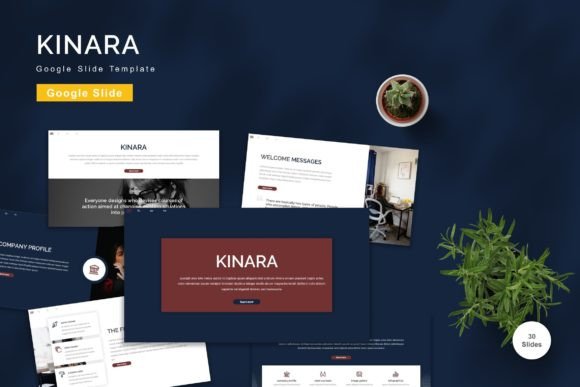
For professionals who frequently find themselves starting from a blank canvas, the initial setup phase of a presentation can be surprisingly time-consuming. Deciding on color palettes, aligning text boxes, sourcing appropriate icons, and ensuring font hierarchy can detract from the core task of content creation. Kinara addresses this friction by providing a comprehensive library of 150 total slides, organized across five premade color variations. This volume ensures that users are rarely left searching for a specific layout, whether they need a complex data visualization slide, a simple quote highlight, or a team introduction page.
Core Features and Structural Integrity
The foundation of any effective template lies in its technical construction. Kinara is built using vector-based elements and master slides, which are critical features for long-term usability. Vector graphics ensure that images and icons remain crisp and clear regardless of scaling, eliminating the pixelation issues often associated with raster images. Meanwhile, the reliance on master slides means that global changes—such as adjusting the primary brand color or changing the font family—can be executed quickly and uniformly across the entire deck. This level of control is essential for businesses that need to maintain strict brand guidelines without manually editing every single slide.
The template includes 30 useful slide layouts that cover the most common presentation scenarios. These are not arbitrary designs but are crafted to support logical information flow. From title slides and agenda overviews to detailed comparison charts and contact pages, the variety allows for a cohesive narrative structure. Furthermore, the inclusion of animated slides adds a layer of engagement. Animation, when used sparingly and purposefully, can guide the audience’s attention and make complex transitions smoother. Kinara provides these animations pre-built, allowing users to enhance their delivery without needing advanced knowledge of motion design principles.
Usability and Customization Flexibility
One of the most significant advantages of the Kinara - Google Slide Template is its accessibility. It leverages recommended free web fonts, which removes the barrier of licensing costs and compatibility issues. Users do not need to purchase expensive typefaces or worry about fonts breaking when the file is shared with colleagues who may not have the same software libraries. The "drag and drop" functionality is intuitive, making it easy for individuals with varying levels of design expertise to replace placeholder images and input their own content seamlessly.
Customization extends beyond simple text replacement. The five premade colors offer a starting point, but because all elements are fully editable, users can adjust hues to match specific corporate identities or personal preferences. This flexibility is crucial for freelancers and agencies who manage multiple clients with distinct branding requirements. Instead of creating a new template from scratch for each client, a designer can duplicate the Kinara file, adjust the master slide colors, and have a branded presentation ready in minutes. This efficiency translates directly into billable hours saved and faster project turnaround times.
Real-World Application and Audience Fit
Who benefits most from this resource? The answer spans a wide demographic of adult professionals. For small business owners, who often wear multiple hats including marketing and sales, Kinara provides a polished look that might otherwise require hiring a graphic designer. For educators, the structured layouts help in organizing complex information into digestible segments, enhancing student comprehension. Marketers and bloggers can use the template to create visually appealing media kits or strategy decks that reflect professionalism and attention to detail.
Consider the scenario of a startup founder preparing for a series of investor meetings. Consistency is key to building trust. Using a template like Kinara ensures that every chart, image, and bullet point adheres to the same visual language, reinforcing the brand’s identity. The widescreen format included in the package is particularly relevant today, as most presentations are delivered on modern monitors, laptops, and large conference displays rather than older projectors. This attention to aspect ratio prevents awkward black bars or stretched images, contributing to a more professional appearance.
Evaluating Quality and Long-Term Value
When evaluating digital assets, longevity and reliability are paramount. Kinara offers long-term value because it is not tied to a specific, fleeting design trend. Its clean, minimalist approach ensures that the slides will remain relevant and professional for years. The fact that the package includes five separate Google Slide files, each with a different color scheme, adds to its versatility. Users can choose the base that closest matches their needs and further refine it, rather than forcing a single color scheme to work for every project.
However, it is important to approach any template with realistic expectations. While Kinara provides a strong framework, it is not a substitute for thoughtful content. The "readme first" instruction included in the download is a vital step that many users overlook. Understanding how the master slides function and how to properly replace placeholders ensures that the editing process remains smooth. Additionally, users should note that preview images are not included in the final download, meaning the value lies entirely in the functional files provided. This transparency helps set the right expectation: you are buying a tool, not a finished product.
Practical Recommendations for Implementation
To maximize the effectiveness of the Kinara - Google Slide Template, users should begin by defining their core message before opening the file. Select the color variation that best aligns with the emotional tone of the presentation—cooler tones for analytical data, warmer tones for creative or community-focused topics. Utilize the vector-based icons to maintain visual consistency, and resist the urge to overcrowd slides. The template provides ample white space, which should be preserved to enhance readability.
For teams, the collaborative nature of Google Slides makes Kinara an excellent choice for remote work environments. Multiple stakeholders can comment on and edit the presentation in real-time, streamlining the review process. Because the fonts are web-based, there is no risk of formatting errors when team members access the file from different devices or operating systems. This reliability reduces technical friction and allows the team to focus on refining the narrative rather than troubleshooting layout issues.
In conclusion, the Kinara - Google Slide Template represents a practical investment for anyone serious about improving their presentation workflow. It balances aesthetic quality with functional ease, offering a comprehensive set of tools that cater to diverse professional needs. By leveraging its editable elements, master slide architecture, and versatile color options, users can create compelling, professional-grade presentations efficiently. Whether you are a seasoned designer looking to speed up your workflow or a novice seeking a reliable starting point, Kinara provides the structural support necessary to let your content shine.