Mastering Digital Communication: The Essential Role of Vector Business App Icons in Modern UX Design
In the rapidly evolving landscape of digital interfaces, visual communication has become just as critical as textual information. When users interact with a website, mobile application, or software program, they rely heavily on intuitive visual cues to navigate complex systems efficiently. This is where business app icons play a pivotal role. Far from being mere decorative elements, these graphical assets serve as the universal language of user experience (UX) design, bridging the gap between human intent and machine functionality.
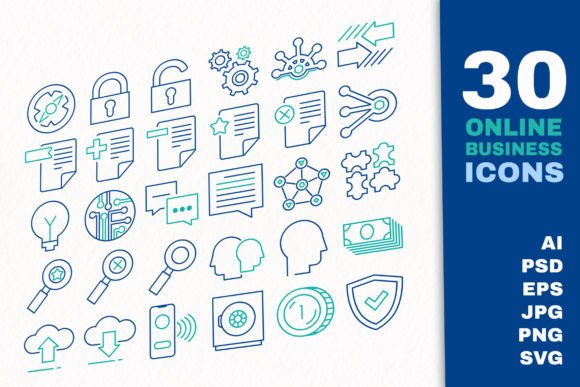
For designers, developers, and business owners, understanding the significance of high-quality icon sets is essential for creating professional, user-friendly digital products. A comprehensive collection, such as a Vector Outline Online Business App Icons Set, provides the foundational building blocks necessary to construct clear, engaging, and functional interfaces across various platforms.
The Strategic Importance of Iconography in Business Technology
Icons are the silent ambassadors of your brand’s usability. In the context of business technology, where efficiency and clarity are paramount, well-designed icons reduce cognitive load. They allow users to recognize actions instantly without reading lengthy labels. Consider the standard symbols for search, add, delete, download, and upload. These are not arbitrary shapes; they are standardized visual metaphors that users have learned to interpret subconsciously.
A robust icon set covers a wide spectrum of business activities. For instance, icons representing finance and strategy help visualize data-heavy concepts, making them accessible to stakeholders. Similarly, symbols for marketing and shopping guide customers through e-commerce journeys, while security icons reassure users about the safety of their data. By integrating these elements into your design, you create a cohesive narrative that enhances trust and engagement.
Why Vector Formats Are Non-Negotiable for Professional Design
One of the most common misunderstandings among beginners is the difference between raster and vector graphics. Raster images (like standard JPGs or PNGs at low resolutions) are made of pixels. When you enlarge them, they become blurry and pixelated. In contrast, vector graphics are based on mathematical equations. This means they can be scaled to any size—from a tiny favicon to a massive billboard—without losing any quality.
For modern web and app development, this scalability is crucial. Devices today range from small smartwatches to 4K desktop monitors. A Business technology UX set icon vector ensures that your interface looks crisp and professional on every screen. Furthermore, vector files are typically smaller in file size compared to high-resolution raster images, which contributes to faster loading times—a key factor in SEO and user retention.
Exploring the Versatility of a Comprehensive Icon Set
A high-quality asset pack is not just about quantity; it is about relevance and organization. A typical professional set includes around 30 basic icon templates that cover the core functionalities of most business applications. Let us explore how these specific categories fit into real-world scenarios:
- File Actions: Icons for preview, zoom, and document management are essential for cloud storage services and productivity tools. They help users manipulate files intuitively.
- Account Management: Symbols for account settings and user profiles are standard in any platform requiring personalization. Clear iconography here reduces support tickets by helping users find configuration options easily.
- Commercial Features: Icons representing discount tags, shopping carts, and payment security are vital for e-commerce sites. They draw attention to sales and reassure users during checkout.
- Cloud Services: As remote work becomes the norm, icons depicting cloud uploads, synchronization, and server status are indispensable for SaaS (Software as a Service) platforms.
By having these elements pre-designed in a well-organized manner, designers can save hundreds of hours. Instead of drawing each icon from scratch, they can focus on the broader user journey and interaction design.
Customization and Ease of Use
Every brand has a unique visual identity. Therefore, the ability to customize assets is a critical feature. A premium icon set should offer files in formats that are easy to edit. For example, an AI CS6 file with separate artboards allows designers using Adobe Illustrator to modify stroke weights, colors, and shapes effortlessly. Similarly, a PSD file enables Photoshop users to adjust layers and effects.
Most modern sets use RGB color mode, which is optimized for digital screens. However, the true power lies in the outline style. Outline icons are minimalist and versatile, blending seamlessly into both light and dark modes. They can be filled with brand colors or left as clean lines to maintain a subtle aesthetic. This flexibility ensures that the icons do not clash with other UI elements but rather complement them.
Technical Specifications and File Formats Explained
When downloading a professional icon set, understanding the included file types is vital for workflow efficiency. A comprehensive package usually includes a variety of formats to cater to different needs:
- Vector Files (AI, EPS, SVG): These are the source files. SVG (Scalable Vector Graphics) is particularly important for web development because it can be directly embedded into HTML code, allowing for CSS styling and animation. An EPS 10 file ensures compatibility with older vector software, while AI files with separate artboards make batch exporting easier.
- Raster Files (PNG, JPG): While vectors are ideal for design, sometimes you need ready-to-use images. High-quality sets provide PNG files with transparent backgrounds in multiple resolutions (128px, 256px, 512px, 1024px, and even 6000px). Transparency is crucial for overlaying icons on colored backgrounds without unsightly white boxes. JPG files are also included for scenarios where transparency is not required, such as certain print materials or email newsletters.
It is important to note that preview images and mock-up elements are not included in the functional asset list. These are strictly for presentation purposes on the download page. The actual deliverables are the clean, editable source files and the exported raster images ready for implementation.
Practical Applications Across Industries
The utility of a Business Icons Set extends far beyond simple app development. Here is how different sectors can leverage these assets:
Social Media Marketing: Marketers can use these icons to create visually appealing infographics. For example, using a strategy icon next to a growth chart or a security lock icon when discussing data privacy builds immediate visual context.
Educational Materials: In online courses or corporate training modules, icons help break down complex text. Using a download icon to indicate downloadable resources or a zoom icon to suggest closer inspection of a diagram enhances learning outcomes.
Print Media: Although designed for digital use, high-resolution PNGs and vector EPS files are perfect for brochures, business cards, and annual reports. The clean lines of outline icons look sophisticated in print, maintaining a modern corporate aesthetic.
Building a Better User Experience
Ultimately, the goal of using professional icons is to improve the user experience. When users can navigate your site or app without confusion, they are more likely to convert, stay engaged, and return. A cluttered interface with inconsistent or low-quality icons creates friction. In contrast, a unified set of vector outline icons creates a sense of order and professionalism.
By choosing a set that includes essential functions like search, add, delete, and account settings, you ensure that the fundamental interactions of your digital product are covered. This allows you to focus on unique features while relying on standardized, recognizable symbols for common tasks.
Conclusion
In conclusion, investing in a high-quality Vector Outline Online Business App Icons Set is a strategic decision for any digital project. It provides the versatility, scalability, and professional polish needed to compete in today’s market. Whether you are designing a complex financial dashboard, a simple e-commerce store, or an educational platform, these assets serve as the visual backbone of your user interface. By understanding the technical benefits of vector formats and the semantic power of well-chosen icons, you can create digital experiences that are not only functional but also delightful to use.
Remember, good design is invisible. It works so smoothly that users barely notice it. With the right icon set, you achieve exactly that: seamless, intuitive, and effective communication.