Streamline Your Presentations with Suimfet
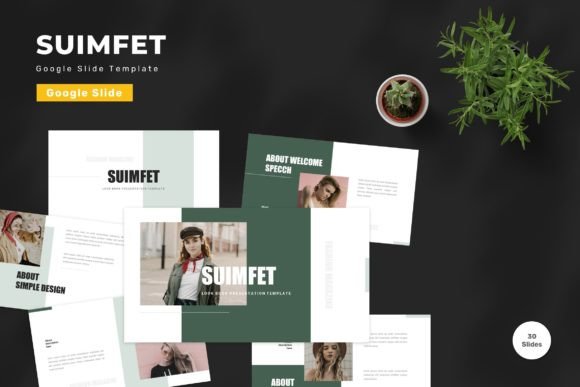
Creating a professional presentation from scratch is often one of the most time-consuming tasks in any creative or business workflow. You spend hours aligning text boxes, hunting for the right color palette, and trying to make charts look cohesive. This is where a well-designed template becomes an invaluable asset rather than just a shortcut. The Suimfet - Google Slide Template offers a comprehensive solution for anyone looking to elevate their visual communication without needing advanced design skills. It is built for flexibility, allowing users to focus on their message while the design handles the heavy lifting.
Why Design Flexibility Matters
One of the biggest frustrations with pre-made templates is rigidity. Many options lock you into a specific aesthetic that might not match your brand or personal style. Suimfet approaches this differently by prioritizing editability. Every element on this template is fully customizable. Whether you need to input your specific content, replace placeholder images with your own photography, or adjust colors to match your company branding, the process is intuitive. This level of control ensures that your final deck feels unique to you, not like a generic download.
The template utilizes vector-based graphics and master slides, which are foundational concepts in professional design but simplified here for ease of use. Vector elements mean that icons and shapes remain crisp at any size, preventing the pixelation that often plagues lower-quality templates. Master slides allow you to make global changes quickly. If you decide that all your headers should be a different shade of blue, you can update it in one place, and it reflects across the entire presentation. This feature alone saves hours of manual editing.
A Library of Versatile Layouts
With 150 total slides included in the package, the Suimfet - Google Slide Template provides a vast array of options for various storytelling needs. It is not just about having many slides; it is about having the right types of slides. The collection includes 30 useful, distinct slide layouts designed to handle common presentation scenarios. You will find dedicated layouts for team introductions, data visualization, timeline overviews, quote highlights, and contact information.
This variety supports a wide range of users. For entrepreneurs pitching to investors, the clean data slides help present financial projections clearly. Educators can use the structured layouts to organize lesson plans or lecture notes logically. Marketers might leverage the image-heavy slides to showcase product features or campaign results. Because the template covers such a broad spectrum of use cases, it serves as a reliable toolkit for both business and personal needs. You do not need to switch between multiple templates for different projects; Suimfet adapts to the context.
Color and Typography Made Simple
Visual consistency is key to a polished presentation. Suimfet comes with five premade color schemes, offering a solid starting point for those who may not have a designer’s eye for color theory. These palettes are curated to ensure readability and visual harmony. However, if you have specific brand guidelines, changing these colors is straightforward. The drag-and-drop functionality makes swapping out hues effortless, allowing you to maintain brand integrity without technical hassle.
Typography also plays a crucial role in how your audience perceives your content. This template recommends free web fonts, ensuring that your text looks professional and remains legible across different devices. Since it is built for Google Slides, compatibility is seamless. You do not need to worry about font licensing issues or missing typefaces when sharing your file with colleagues or clients. The text fields are easily editable, letting you adjust hierarchy and emphasis to guide your audience’s attention effectively.
Enhancing Engagement with Animation
Static slides can sometimes fail to hold an audience’s attention. To combat this, all presentations in the Suimfet pack include animated slides. These animations are designed to be subtle and professional, avoiding the distracting effects that often detract from the message. Animated transitions can help reveal information step-by-step, keeping your audience focused on the current point rather than reading ahead. This feature is particularly useful for complex explanations or data-heavy sections where pacing is important.
For beginners, adding animation can seem intimidating. However, because these animations are pre-built into the template, you do not need to configure them manually. They are ready to use, adding a layer of polish and dynamism to your delivery with zero extra effort. This allows even novice users to create presentations that feel high-end and engaging.
Practical Use Cases for Modern Professionals
The versatility of the Suimfet - Google Slide Template makes it suitable for a wide demographic, from freelancers to corporate teams. Consider a small business owner preparing a quarterly review. They can use the widescreen format to display high-resolution images of their products alongside key performance indicators. The editable nature of the template means they can quickly update figures each quarter without redesigning the entire deck.
Freelancers and consultants can also benefit significantly. When pitching to new clients, first impressions matter. A sleek, well-organized proposal created with Suimfet demonstrates professionalism and attention to detail. The inclusion of a readme file ensures that even first-time users can navigate the template’s features efficiently, reducing the learning curve. Additionally, the package includes five separate Google Slide files, each corresponding to one of the premade colors. This organization allows you to choose the base that best fits your mood or project requirements immediately.
Important Considerations Before You Start
While Suimfet is designed for ease of use, there are a few practical points to keep in mind. First, always read the included readme information before diving in. This document provides essential tips on how to best utilize the master slides and manage the editable elements. Understanding the structure upfront will save you time during the editing process.
It is also important to note that preview images are not included in the download. This is standard for digital template products to protect intellectual property, but it means you will need to source your own visuals. Fortunately, the placeholders are designed to accept images easily, so you can drag and drop your own photos or stock images directly into the designated areas. Ensure you have high-quality images ready to maintain the professional look of the template.
Finally, remember that while the template provides the structure, your content is the star. Use the 150 slides as a canvas, but tailor the text and visuals to tell your specific story. The goal is to enhance your communication, not replace it. By combining your unique insights with the robust design framework of Suimfet, you can create presentations that are not only visually appealing but also impactful and memorable.
Whether you are a student working on a thesis defense, a marketer launching a new campaign, or a teacher creating interactive lessons, this tool offers the reliability and flexibility needed in today’s fast-paced digital environment. Get it now Suimfet - Google Slide Template for all business and personal needs, and transform the way you present your ideas.